1. Optimize Security Settings
For Excel 2007 / 2010 / 2013 / 2016 / 2019 / 2021 / 2024 / 365: Simply navigate to File → Options → Trust Center → Trust Center Settings → Macro Settings and select "Enable all macros" to begin.

Legacy Office (2000/2003): Configure your security via Tools → Macro → Security to "Low."
2. Access the Power of VBA
Instantly launch the robust VBA Editor dashboard by pressing ALT + F11.
3. Connect to Advanced Libraries
Unlock advanced functionality by clicking Tools → References. Browse to your cruflbcs.dll file (found in C:\Program Files (x86)\Common Files\Barcodesoft\Fontutil) and ensure crUFLBcs 5.0 Type Library is checked for seamless integration.

4. Import High-Performance Modules
Tap Ctrl + M to import the powerful barcodesoft.bas file. Need the source? Grab the complete package here: cruflbcs.zip.

5. Generate Barcodes Instantly
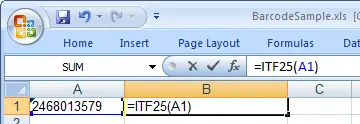
Return to your spreadsheet and unleash the power of automation. Simply use the custom formula to convert your data into professional-grade barcodes:
Our optimized macro allows you to process entire columns in seconds—just drag and copy the formula to scale your operations effortlessly.
6. Apply Professional Styling
Give your barcodes a professional polish. Right-click your output cell, select "Format Cells," and apply the UpcEanM typeface. Set your style to "Regular" with no underlines for a clean, scannable finish.
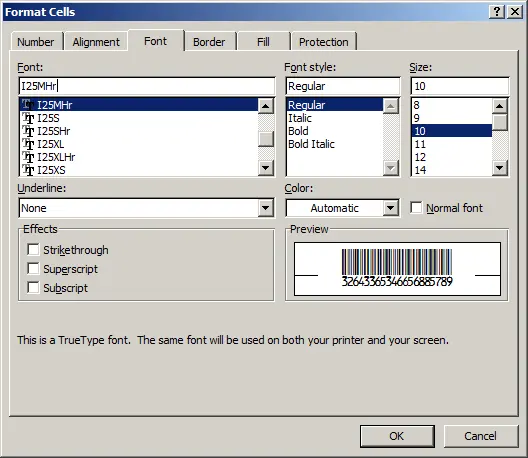
Click OK, and watch your data instantly transform into high-quality, ready-to-use Interleaved 2-of-5 barcodes!