1
Install TrueType Fonts
Locate all TrueType Font files (*.ttf) in your download package and copy them to your system directory: C:\Windows\Fonts.
Code 128 is the industry standard for high-density linear barcodes. Because it requires a mandatory checksum digit, manual entry isn't possible—but with the Barcodesoft font package, professional printing is seamless.
 Download Demo

 Order Full Version
Locate all TrueType Font files (*.ttf) in your download package and copy them to your system directory: C:\Windows\Fonts.
Open the Command Prompt (DOS) as Administrator and execute the following commands to register the encoder component:
# Navigate to directory
CD C:\Program Files (x86)\Common Files\Barcodesoft\FontUtil
# Register DLL
regsvr32 crUFLbcs.dll

If registration fails, use the .NET utility:
Regtlibv12 _cruflbcs.tlb
Launch Excel and adjust security settings to allow the barcode generator to run:

Set Security to "Low"


Choose "Enable all macros" in Trust Center
Press ALT + F11 to open the VBA Editor.

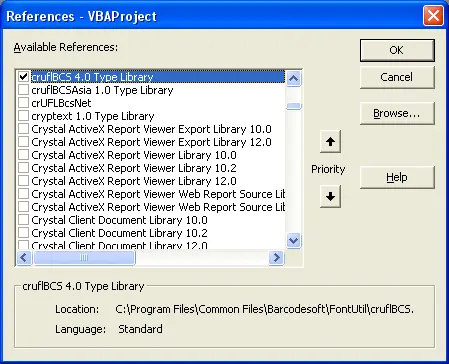
Go to Tools > References. Click Browse and select cruflbcs.dll (found in C:\Program Files\CommonFiles\Barcodesoft\Fontutil). Ensure the checkbox is checked.
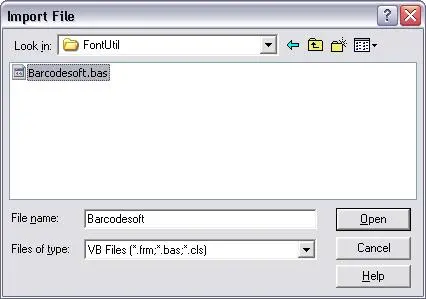
Press Ctrl + M and import barcodesoft.bas.
Missing the file? Download it here: Barcode Software Module
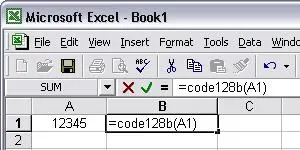
You can now use custom formulas to encode your data. Use cell references (e.g., A1) inside the following functions:
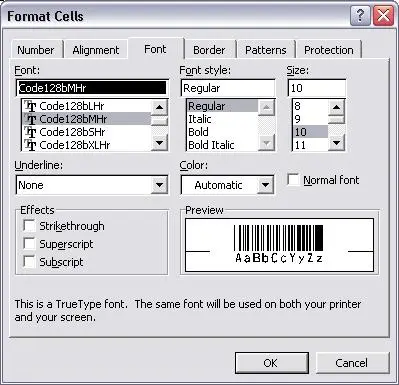
Right-click the encoded cell > Format Cell > Font. Select a Barcodesoft typeface like Code128aMHr.