Professional Barcode Generation in Delphi
A comprehensive guide to integrating linear and 2D barcodes into your VCL applications.
Ready to get started?
Download the Barcodesoft Encoder Delphi components.

Developers looking for a robust way to generate barcodes in Delphi need look no further. The Barcodesoft Encoder provides a smart, high-performance solution for generating both linear (1D) and two-dimensional (2D) barcodes within your native Delphi applications.
1 Prepare Your Environment
Create a new VCL Forms Application. Add a TButton and a TMemo.
A TMemo is essential for 2D barcodes like QR Codes, as they often contain multiple lines of encoded text data.
2 Register the Encoder DLL
Run the following DOS command to register the component:

Pro Tip: If registration fails, use the .NET Framework utility:
Regtlibv12 _cruflbcs.tlb
3 Import the Component
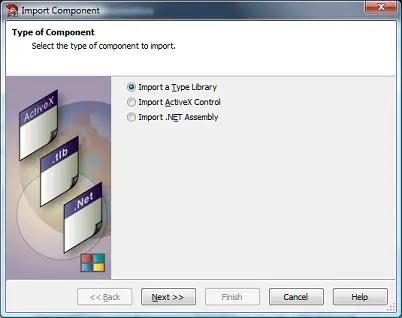
- Go to Component → Import Component.
- Choose Type Library and click Next.
- Add
cruflBCS_TLBto yourusessection. - Select the DLL from
C:\Program Files (x86)\Common Files\Barcodesoft\FontUtil.
Implementation Examples
Linear Barcodes (1D)
Supports Code39, Code128, GS1-128, UPC-A, and EAN13.
// Code 39 Implementation
procedure TForm1.Button1Click(Sender: TObject);
var
  I : ILinear;
  str : WideString;
begin
  I := CoCLinear.Create;
  str := I.Code39('BARCODE DELPHI');
  Memo1.Text := str;
  Memo1.Font.Name := 'Code39mHr';
end;
// GS1-128 (UCC/EAN-128)
procedure TForm1.Button1Click(Sender: TObject);
var
  I : ILinear;
  str : WideString;
begin
  I := CoCLinear.Create;
  str := I.UCCEAN128('011234567890123456');
  Memo1.Text := str;
  Memo1.Font.Name := 'Code128m';
end;
Advanced 2D Barcodes
Integrate PDF417, Data Matrix, QR Code, Aztec, and MaxiCode.
// QR Code Implementation
procedure TForm1.Button1Click(Sender: TObject);
var
  I : IQRCode;
  str : WideString;
begin
  I := CoCQrcode.Create;
  str := I.Encode('QRCode Barcode Delphi');
  Memo1.Text := str;
  Memo1.Font.Name := 'BcsQrcode';
end;
// Data Matrix Implementation
procedure TForm1.Button1Click(Sender: TObject);
var
  I : IDataMatrix;
  str : WideString;
begin
  I := CoCDataMatrix.Create;
  str := I.Encode('Delphi Data Matrix Barcode');
  Memo1.Text := str;
  Memo1.Font.Name := 'BcsDatamatrix';
end;